PyTorch’s map-style dataset asks only two things of your data: how many items there are, and what item i is. Write one from scratch over the 1,797 digit images of scikit-learn, with the right shapes and dtypes, then meet TensorDataset and decide where a transform belongs.
DL01.9.1L2 Intermediate25 minIn review (what this means)
The maths and code on this page are checked by automated tests on every change, but an independent reader has not signed it off yet. Spot a mistake or a confusing step? Tell us.
State the map-style dataset protocol: len returns the number of items and getitem(i) returns item i.
Write a Dataset class over load_digits that returns a float32 vector of 64 pixels divided by 16 and an int64 label.
Trace one image by hand from its 8 by 8 grid to its position in the flat vector, using position 8r + c.
Choose between preprocessing once in advance and a transform in getitem, and count the work each one does.
The question
scikit-learn hands you the 1,797 digit images as one NumPy array of shape (1797, 8, 8) with values from 0 to 16, and a second array of labels. A PyTorch training loop wants small batches of tensors: float32 inputs and int64 labels. What is the least your data has to offer for PyTorch to do the rest?
Intuition
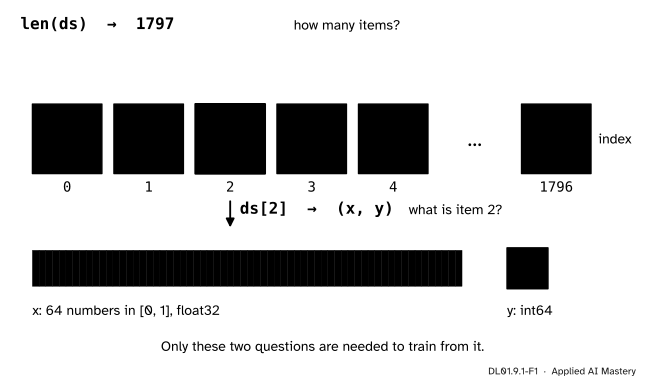
The answer is two questions. A dataset, in PyTorch’s sense, is any object that can say how many items it holds and can hand over item number \(i\) when asked. Everything else, shuffling, cutting into batches and stacking, is the loader’s job, and the loader only ever asks those two questions.
DL01.9.1-F1
A dataset answers two questions. len(ds) says how many items there are; ds[i] returns item \(i\) as a pair: the input \(\cdata{\vect{x}}\), here 64 pixel values, and the label \(\ctruth{y}\).
Think of a chest of numbered drawers. You do not need to know how the drawers are built, whether the images sit in memory, in files on a disk or behind a network, as long as drawer \(i\) opens and gives you one example. That is why the same DataLoader works for eight-pixel digits and for millions of photographs.
Build it up
Step 1. The protocol. In Python, len(ds) calls the method ds.__len__(), and ds[i] calls ds.__getitem__(i). A map-style dataset is an object that implements these two methods: it maps each index \(0, 1, \dots, {n - 1}\) to one item. PyTorch provides a base class, torch.utils.data.Dataset, to inherit from; its documentation asks every subclass to write __getitem__ and, optionally, __len__, which samplers and the loader’s default options need.
Step 2. The raw data.load_digits() returns images of shape (1797, 8, 8): 1,797 greyscale images of 8 by 8 pixels, each pixel a whole number from 0 to 16 stored as float64. The target array of shape (1797,) holds the digit each image shows. Each of the ten classes has between 174 and 183 images.
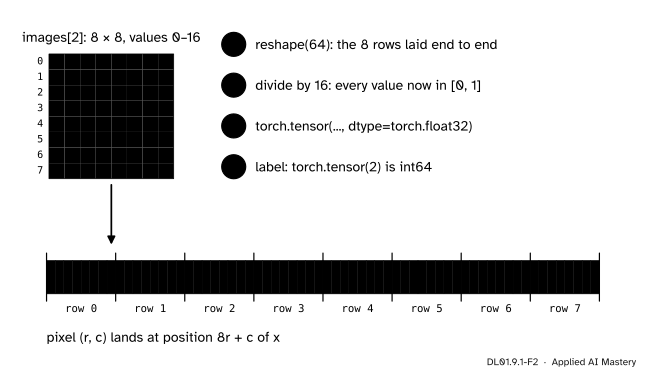
Step 3. One item. The network of this course is a multilayer perceptron with 64 inputs, so an image must become a flat vector. image.reshape(64) lays the eight rows end to end: row 0 fills positions 0 to 7, row 1 fills positions 8 to 15, and so on.
DL01.9.1-F2
How one image becomes one input. The rows are laid end to end, the values are divided by 16, and the result becomes a float32 tensor. The label becomes an int64 tensor.
Step 4. Scale and type. Dividing by 16 puts every pixel in \([0, 1]\), so that the first layer’s pre-activations start out small. Then the dtypes. A network’s weights are float32 (DL01.7.1), so the input must be float32 too: a float64 input raises an error in the first layer. nn.CrossEntropyLoss wants class labels as int64 (DL01.7.4), which is what torch.tensor(label) gives for a whole number.
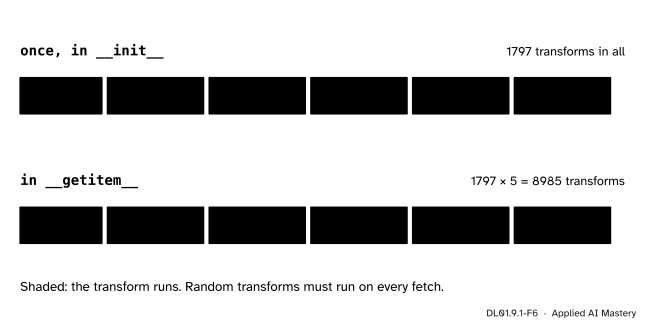
Step 5. Where the work happens. The flattening and scaling can be done once, for all 1,797 images, when the dataset is made, or inside __getitem__, each time an item is fetched. The second way is called a transform: a function applied to an item on its way out.
DL01.9.1-F6
A fixed transform done once costs 1,797 calls. Done in __getitem__, it costs 1,797 calls in every epoch. That is worth paying only when the transform must differ from one fetch to the next.
The formal statement
NoteDefinition: map-style dataset
A map-style dataset of size \(n\) is an object ds with two methods:
len(ds) returns \(n\);
ds[i], for each whole number \(0 \le i < n\), returns the \(i\)-th item.
For supervised learning an item is a pair \({(\cdata{\vect{x}}_i, \ctruth{y_i})}\). For this module’s digits, write \(\mat{P}_i\) for image \(i\), an 8 by 8 array with entries \(p_{rc}\) in \(\{0, 1, \dots, 16\}\). The item is
Here \(r\) is the row and \(c\) the column, both counted from 0 as in code. The rule \({8r + c}\) is the row-by-row order that NumPy’s reshape uses by default (C order): within a row, \(c\) runs through 0 to 7; then the next row starts 8 places later.
The shapes for one item and, looking ahead to DL01.9.2, for a batch of \(\abs{B}\) items:
What
One item
A batch
input
(64,) float32
(batch, 64) float32
label
() int64
(batch,) int64
The label of one item is a tensor with no axes, a scalar tensor. Stacking \(\abs{B}\) of them gives the vector of shape \({(\abs{B},)}\) that nn.CrossEntropyLoss expects.
TensorDataset. When all inputs and labels already sit in two tensors with the same first length, torch.utils.data.TensorDataset(X, y) is a ready-made map-style dataset: len is that first length and item \(i\) is (X[i], y[i]), each tensor indexed along its first axis.
The cost of a transform. Over \(E\) epochs a loop fetches each of the \(n\) items once per epoch, \(nE\) fetches in all. A transform in __getitem__ runs \(nE\) times; done once in advance it runs \(n\) times. For the digits over five epochs that is \(8{,}985\) against \(1{,}797\).
Worked example
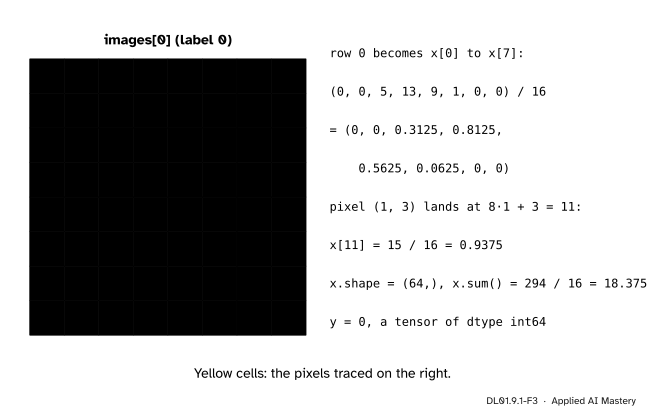
Item 0, by hand. Image 0 shows a zero. Its 64 pixel values, row by row, are drawn below.
DL01.9.1-F3
Item 0 traced. The yellow row becomes the first eight entries of \(\vect{x}\); the yellow pixel at row 1, column 3 becomes entry 11. Every value is divided by 16.
Row 0. Its pixels are \(0, 0, 5, 13, 9, 1, 0, 0\). With \(r = 0\), positions \({8 \cdot 0 + c} = c\), so these become \(x_0\) to \(x_7\):
One pixel of row 1. The pixel at \(r = 1\), \(c = 3\) has value 15. It lands at position \({8 \cdot 1 + 3} = 11\), so \(x_{11} = 15/16 = 0.9375\).
The whole vector. The 64 pixel values add up to 294, so the entries of \(\vect{x}\) add up to \({294 / 16} = 18.375\). Its largest entry is \({15/16} = 0.9375\); 35 of the 64 pixels are not zero.
The label.digits.target[0] is 0, so \(y = 0\), stored as an int64 scalar tensor.
Code
The dataset from scratch. __init__ keeps the arrays; __getitem__ builds one item, applying an optional transform.
import numpy as npimport torchfrom torch.utils.data import Dataset, TensorDatasetfrom sklearn.datasets import load_digitstorch.manual_seed(0)digits = load_digits()class DigitsDataset(Dataset):"""Map-style dataset over load_digits: item i is (64 pixels / 16 as float32, label as int64)."""def__init__(self, images, labels, transform=None):self.images = images # shape (n, 8, 8), values 0 to 16self.labels = labels # shape (n,)self.transform = transformdef__len__(self):returnlen(self.labels)def__getitem__(self, i): x = torch.tensor(self.images[i].reshape(64) /16, dtype=torch.float32)ifself.transform isnotNone: x =self.transform(x)return x, torch.tensor(self.labels[i]) # a whole number gives int64ds = DigitsDataset(digits.images, digits.target)x, y = ds[0]print(len(ds), x.shape, x.dtype, y.shape, y.dtype, int(y))print(x[:8].tolist(), round(x[11].item(), 4), round(x.sum().item(), 4))print("classes:", np.bincount(digits.target).min(), "to", np.bincount(digits.target).max(), "images each")
Now count the work of a transform. Five passes over the data, once with the transform inside __getitem__ and once with it applied in advance.
calls =0def centre(x):"""A fixed transform: shift the pixels so that they have mean zero."""global calls calls +=1return x - x.mean()lazy = DigitsDataset(digits.images, digits.target, transform=centre)for epoch inrange(5):for i inrange(len(lazy)): lazy[i]lazy_calls = callscalls =0eager = TensorDataset(torch.stack([centre(X_all[i]) for i inrange(len(X_all))]), y_all)for epoch inrange(5):for i inrange(len(eager)): eager[i]eager_calls = callsprint("in __getitem__:", lazy_calls, " once in advance:", eager_calls)print("same items:", torch.allclose(lazy[7][0], eager[7][0]))
in __getitem__: 8985   once in advance: 1797
same items: True
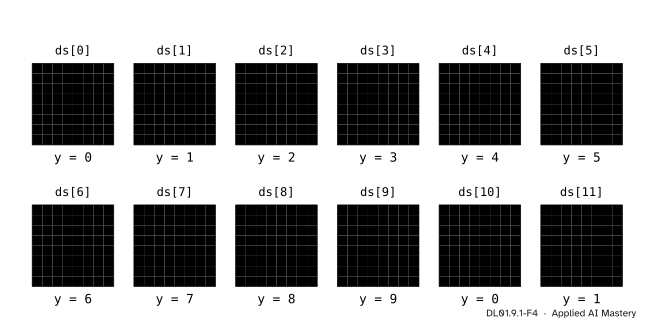
The first twelve items, drawn from the dataset. Each picture is ds[i][0] reshaped back to 8 by 8.
DL01.9.1-F4
The first twelve items. The labels run 0 to 9 and start again: the file is not sorted by class, but it is not shuffled either, which matters in the next lesson.
Explore
This module’s interactive, the epoch shuffler, lives in DL01.9.3. It treats 24 examples as numbered tiles, exactly as a dataset does: a loader sees only the indices 0 to 23. Before you open it, change __getitem__ above to return self.images[i].reshape(64) with no division and no torch.tensor, and predict which line of a training loop fails first.
Pitfalls
DL01.9.1-F5
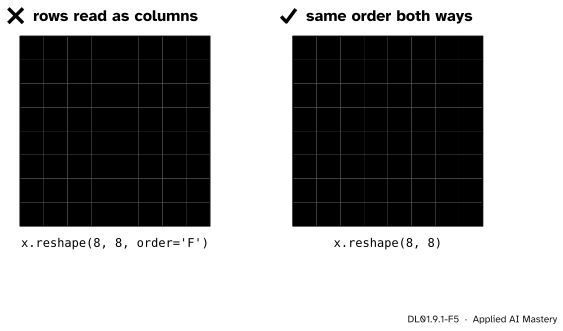
Wrong beside right. The vector was made row by row. Read back column by column (order='F'), the 7 turns over its diagonal; read back in the order it was made, it is a 7 again.
“The flattening order does not matter, so I can undo it any way I like.”
For the network it does not matter, as long as every image is flattened the same way: DL01.10.4 shows that a multilayer perceptron does not use which pixels are neighbours. For you it matters. Draw an item, or combine data from two sources, and a different order transposes the picture. Flatten and unflatten with the same rule, here \({8r + c}\).
“NumPy gave me float64, so the tensor will be fine.”
torch.tensor keeps the dtype of a NumPy array, so float64 pixels make a float64 tensor, and the first nn.Linear, whose weights are float32, refuses it with a dtype error. Ask for dtype=torch.float32 when you build the item, as the class above does.
“Raw pixels from 0 to 16 are just as good as scaled ones.”
They carry the same information, but for the same weights they make the weighted sum \(\mat{W}^{(1)}\vect{x}\) of the first layer 16 times larger, and the gradient of each first-layer weight, which is a multiple of its input pixel, grows with it. A learning rate that suits scaled inputs can then be far too large. Divide by 16, a fixed number known in advance, so no statistics of the data are needed and nothing can leak from a validation set (ML01.2.4).
Check yourself
Recall
1. Which two methods make an object a map-style dataset, and what does each return?
Show answer
__len__, which returns the number of items \(n\), and __getitem__(i), which returns item \(i\) for \(0 \le i < n\).
2. At which position of the flat vector does the pixel in row \(r\), column \(c\) of an 8 by 8 image land?
Show answer
At position \({8r + c}\), with rows and columns counted from 0.
3. What dtypes should a digits item have, and why?
Show answer
The input float32, to match the weights of nn.Linear; the label int64, the class-index type that nn.CrossEntropyLoss expects.
4. What does TensorDataset(X, y) return for index \(i\)?
Show answer
The pair (X[i], y[i]): each tensor indexed along its first axis.
5. A fixed transform runs in __getitem__ during 10 epochs over 1,077 images. How many times does it run, and how many if done once in advance?
Show answer
\({1077 \cdot 10} = 10{,}770\) times in __getitem__; \(1{,}077\) times in advance.
Exercises
1.★ Read the grid of item 0 in the worked example. Find the position in \(\vect{x}\) and the value of the pixel at row 6, column 2, and of the pixel at row 2, column 5.
Show solution
Row 6, column 2: position \({8 \cdot 6 + 2} = 50\), pixel value 14, so \(x_{50} = 14/16 = 0.875\). Row 2, column 5: position \({8 \cdot 2 + 5} = 21\), pixel value 11, so \(x_{21} = 11/16 = 0.6875\).
2.★★ Write the inverse of the rule \({8r + c}\): given a position \(j\) from 0 to 63, which row and column does it come from? Check it on \(j = 11\) and \(j = 50\).
Show solution
Divide \(j\) by 8 with remainder: \(j = {8r + c}\) with \(0 \le c \le 7\), so \(r = \lfloor j / 8 \rfloor\) and \(c = {j - 8r}\), the remainder. In Python, r, c = divmod(j, 8). For \(j = 11\): \(r = 1\), \(c = 3\). For \(j = 50\): \(r = 6\), \(c = 2\). Both match the worked example and exercise 1.
3.★★★ A dataset of 50,000 photographs keeps only file names in memory and opens one file in __getitem__. Opening a file and decoding it takes 2 milliseconds. Training runs 30 epochs. How long does loading alone take, and what would you change if the decoding never varies but memory is short?
Show solution
Each epoch fetches every item once: \({50{,}000 \cdot 2}\) ms \(= 100\) s per epoch, and \({30 \cdot 100}\) s \(= 3{,}000\) s, 50 minutes, in all. Decoding once in advance would cost 100 s, but holding 50,000 decoded photographs may not fit in memory. A middle way keeps the work in __getitem__ but makes it cheaper: decode once and save the result in a fast format on disk, so that each fetch only reads it back. DataLoader can also run __getitem__ in parallel worker processes (its num_workers argument), which hides the cost behind the training step.
Summary card
A dataset answers two questions: how many items, and what is item \(i\).
Shortcut.TensorDataset(X, y) indexes two tensors along their first axis.
Transforms. In __getitem__: \(nE\) calls over \(E\) epochs; in advance: \(n\).
Sources and next steps
Sources. Each was opened and checked against this lesson on 15 November 2026.
PyTorch 2.15 documentation, torch.utils.data: a map-style dataset implements the __getitem__() and __len__() protocols; subclasses of Dataset should overwrite __getitem__() and may overwrite __len__(); in a TensorDataset each sample is retrieved by indexing tensors along the first dimension.
scikit-learn 1.9 documentation, sklearn.datasets.load_digits: 10 classes, about 180 samples per class, 1,797 samples, 64 features with integer values 0 to 16; images has shape (1797, 8, 8) and data holds the flattened images, shape (1797, 64).
A. Zhang, Z. C. Lipton, M. Li and A. J. Smola, Dive into Deep Learning, section 4.2: an image dataset wrapped for PyTorch’s loader, whose minibatches come out as float32 images and int64 labels.