A timestamp is a count of time units since 1 January 1970. Count the days to 3 March 2025 by hand, then parse a text column with pd.to_datetime, read its parts with .dt, subtract dates, slice by date, and learn why 03/04/2025 needs its layout stated.
P02.7.1L1 Core25 minIn review (what this means)
The maths and code on this page are checked by automated tests on every change, but an independent reader has not signed it off yet. Spot a mistake or a confusing step? Tell us.
Explain a timestamp as a count of time units since the epoch, and count by hand the 20150 days from 1 January 1970 to 3 March 2025.
Work out the weekday of a date from its day count, and check it with datetime and pandas.
Parse a column of dates with pd.to_datetime, stating the format whenever the text is not ISO, and read its parts with the .dt accessor.
Subtract timestamps to get a Timedelta, and select rows of a DatetimeIndex with a slice of date strings that keeps both ends.
The question
A weather logger writes its dates as text: '2025-03-03', '2025-03-10'. To Python that is ten characters, no different from a name. Yet you want to know that the second date is exactly 7 days after the first, that both are Mondays, and which rows fall in the second week. How does a program turn a date into something it can count with?
Intuition
Pick one moment as the zero of a ruler and count the days since then. Every date becomes a whole number on that ruler. The zero that computers agree on is the start of 1 January 1970, called the epoch. A timestamp is a date (and time) stored as a count of fixed time units since the epoch.
P02.7.1-F1
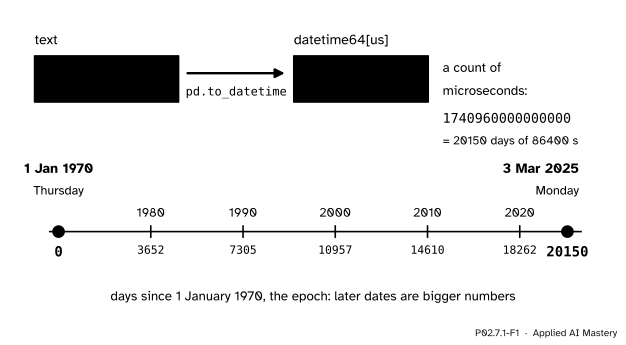
A date as a number. 3 March 2025 is day 20150 on a ruler that starts at 1 January 1970. pandas keeps the same point as a count of microseconds.
On the ruler, three questions become arithmetic. Which date is later? The bigger number. How far apart are two dates? Subtract. Which weekday? Days repeat every 7, so look at the remainder after dividing by 7. Text can do none of this.
The data of this course are invented for teaching. Three stations, coast, hill and valley, are read at noon from Monday 3 to Thursday 6 March 2025, and valley_fortnight holds 14 daily valley temperatures from Monday 3 March: 26, 28, 30, 32, 31, 30, 26, 25, 27, 29, 28, 27, 29, 31.
Build it up
Step 1. The standard library counts days.datetime.date(2025, 3, 3) is a date object. Subtracting two dates gives a timedelta, and its .days is the whole number of days between them: date(2025, 3, 3) - date(1970, 1, 1) has .days equal to 20150. The method .weekday() numbers the days of the week from Monday as 0 to Sunday as 6, so 3 March 2025 gives 0.
Step 2. Text in, date out.date.fromisoformat("2025-03-03") reads the ISO 8601 layout, year-month-day with fixed widths. ISO puts the largest unit first, which is why the course’s logger uses it.
Step 3. A whole column at once.pd.to_datetime(column) parses every entry and returns a Series of dtype datetime64[us]: each entry is stored as one 64-bit integer, a count of microseconds since the epoch. Like the arrays of P02.1, the column now holds one block of numbers of a single type.
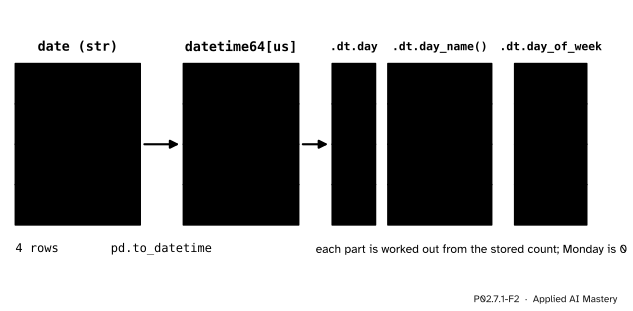
Step 4. Read the parts with .dt. A datetime column has a .dt accessor, a collection of methods that act on every entry, as .str will for text in lesson P02.7.3. .dt.year, .dt.month and .dt.day give numbers, .dt.day_name() gives the name, and .dt.day_of_week gives the weekday as a number, Monday 0.
P02.7.1-F2
Parse once, then read any part. Each column on the right is computed from the count of microseconds stored on the left.
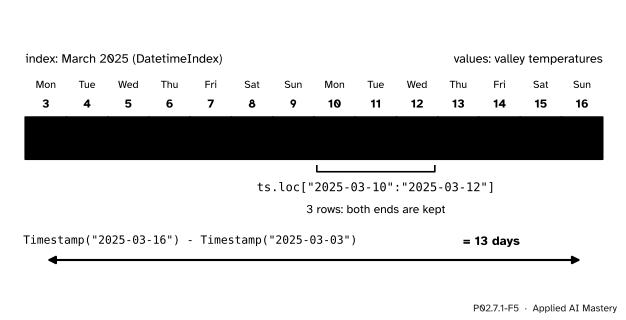
Step 5. Dates as row labels. Make the parsed dates the index of a Series and you get a DatetimeIndex. Its labels are in time order, so a slice of date strings picks out a stretch of days: ts.loc["2025-03-10":"2025-03-12"] returns three rows.
These parts are what a model sees when a date becomes a feature. A model cannot read '2025-03-03', but it can use the day of the week (for shop sales, Saturday differs from Monday), the month (for heating demand) or the number of days since an event.
The formal statement
NoteDefinition: timestamp, epoch, timedelta
The epoch is 00:00 on 1 January 1970. A timestamp is a moment stored as a whole number of time units since the epoch: days for datetime64[D], microseconds for datetime64[us] (pandas’ choice when it parses text), nanoseconds for datetime64[ns]. Moments before the epoch have negative counts.
A timedelta is a length of time. Subtracting two timestamps gives a timedelta (a Timedelta in pandas); adding a timedelta to a timestamp gives a timestamp.
A DatetimeIndex is an index of timestamps. A slice of date strings on it is a label slice, and like every label slice in pandas it keeps both ends.
Three facts follow from “a date is a count”.
Fact 1: changing the unit multiplies. A day has 24 hours of 60 minutes of 60 seconds, so 86400 seconds, and a second has a million microseconds. A date that is day \(d\) is therefore stored in microseconds as
\[
\begin{aligned}
d \times 86400 \times 10^{6}.
\end{aligned}
\]
For \(d = 20150\) that is 1740960000000000, the number in the anchor figure.
Fact 2: the weekday is a remainder. The weekday moves on by one each day and comes back after 7 days. 1 January 1970 was a Thursday, which .weekday() numbers 3. So day \(d\) has weekday
where \(a \bmod 7\) is the remainder of \(a\) after dividing by 7, Python’s a % 7. Monday is 0.
Fact 3: differences do not depend on the epoch. If two dates have counts \(d_1\) and \(d_2\), the days between them are \({d_2 - d_1}\). Moving the zero of the ruler adds the same number to both counts, and it cancels in the difference. So any epoch works for gaps; 1970 matters only for the raw count.
P02.7.1-F5
A DatetimeIndex orders the rows in time. A slice of date strings keeps both ends, and two timestamps subtract to a Timedelta.
Worked example
Count the days from 1 January 1970 to 3 March 2025 by hand, and find the weekday.
P02.7.1-F3
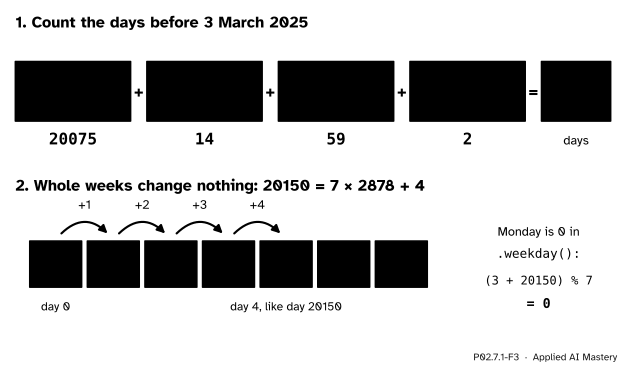
The count in four pieces, then the weekday from the remainder.
Whole years. From 1 January 1970 to 1 January 2025 there are 55 years. Counted at 365 days each, that is 55 × 365 = 20075 days.
Leap days. Each leap year adds a 29 February. Between 1970 and 2024 the leap years are 1972, 1976, and so on to 2024, every fourth year. 2000 is one of them: a year divisible by 100 is a leap year only if it is also divisible by 400, and 2000 is. That makes (2024 − 1972) / 4 + 1 = 14 leap days, so 1 January 2025 is day 20075 + 14 = 20089.
Into 2025. January has 31 days and February 28, since 2025 is not a leap year. 1 March is 59 days after 1 January, and 3 March two more: 20089 + 59 + 2 = 20150.
The weekday. Divide by 7: 7 × 2878 = 20146, so 20150 = 7 × 2878 + 4. The 2878 whole weeks bring Thursday round to Thursday again, and the 4 days left over step on to Friday, Saturday, Sunday, Monday. By Fact 2, (3 + 20150) mod 7 = 20153 mod 7 = 0, which is Monday.
Code
First the count from scratch, with a loop over the years and the months, checked against the standard library.
import datetime as dtdef is_leap(year):return year %4==0and (year %100!=0or year %400==0)def days_since_epoch(year, month, day):"""Whole days from 1 January 1970 to the given date (for dates from 1970 on).""" month_lengths = [31, 28, 31, 30, 31, 30, 31, 31, 30, 31, 30, 31] days =0for y inrange(1970, year): days +=366if is_leap(y) else365for m inrange(1, month): days +=29if (m ==2and is_leap(year)) else month_lengths[m -1]return days + (day -1)d = days_since_epoch(2025, 3, 3)weekday = (3+ d) %7print(d, weekday)print((dt.date(2025, 3, 3) - dt.date(1970, 1, 1)).days, dt.date(2025, 3, 3).weekday())print(d *86400*10**6)
20150 0
20150 0
1740960000000000
Now pandas. Parse the column, look at the dtype, and read the parts.
import numpy as npimport pandas as pddates = pd.Series(["2025-03-03", "2025-03-04", "2025-03-05", "2025-03-06"])when = pd.to_datetime(dates)print(dates.dtype, "->", when.dtype)print(when.astype("int64").tolist()) # microseconds since the epochprint(when.dt.day.tolist(), when.dt.day_name().tolist(), when.dt.day_of_week.tolist())gap = pd.Timestamp("2025-03-16") - pd.Timestamp("2025-03-03")print(repr(gap), gap.days)
pd.date_range makes a run of evenly spaced timestamps; freq="D" means one a day. The hottest day of the fortnight, found with idxmax, is Thursday 6 March at 32 °C.
Explore
This module’s interactive, Resample and roll, lives in the next lesson. It draws valley_fortnight on a time axis like the strip above. Choose a rolling window of 7 days and step to Sunday 9 March: the window covers Monday 3 to Sunday 9, exactly 7 days, and its mean is 29.
Pitfalls
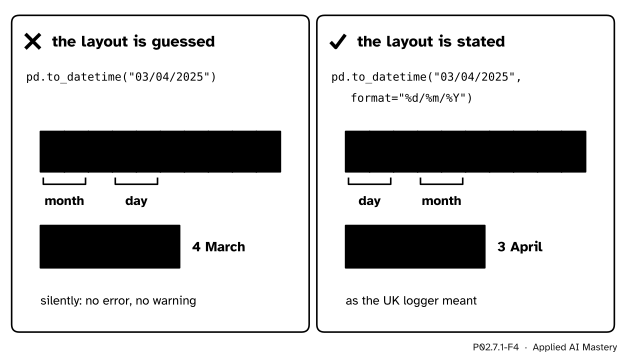
P02.7.1-F4
Wrong beside right. With no format, pandas reads 03/04/2025 month first. Stating the layout gives the date the logger meant.
“pandas knows what my dates mean.”
It does not. pd.to_datetime("03/04/2025") returns 4 March 2025, the American reading, with no warning. A logger in Britain meant 3 April. Whenever the text is not ISO, state the layout: format="%d/%m/%Y" (day, month, four-digit year), or at least dayfirst=True. The pandas documentation warns that dayfirst is not strict: a date that cannot be read day first is read month first instead.
“The first row decides, so the rest will follow.”
When no format is given, pandas guesses one layout for the whole column. For ["03/04/2025", "13/04/2025"] it guesses month first from the first entry, and then fails on 13/04/2025, because there is no thirteenth month. Swap the two entries and the column is read day first, with a warning. The same data, in a different order, gives a different answer. The cure is the same: state the format.
“Sorting the text sorts the dates.”
Only for ISO text. '2025-03-10' < '2025-03-16' is True because ISO writes the largest unit first, with fixed widths. But '13/03/2025' > '03/04/2025', since text compares character by character and '1' comes after '0', although 13 March comes before 3 April. Parse first, then sort.
“A timestamp says where it was taken.”
The timestamps in this lesson are naive: they carry no time zone. Noon in London and noon in Accra are the same naive timestamp. pandas can attach a zone (tz_localize) and convert between zones (tz_convert), but that is beyond this lesson. Keep the zone of the logger in mind.
Check yourself
Recall
1. What is a timestamp, and what is the epoch?
Show answer
A timestamp is a moment stored as a whole number of time units since the epoch, which is 00:00 on 1 January 1970.
2. What dtype does pd.to_datetime give a column of ISO text in pandas 3, and what does each entry hold?
Show answer
datetime64[us]. Each entry is one 64-bit integer, a count of microseconds since the epoch.
3. 3 March 2025 is day 20150. Why is it a Monday?
Show answer
1 January 1970 was a Thursday (weekday 3). (3 + 20150) mod 7 = 20153 mod 7 = 0, and 0 is Monday: the 2878 whole weeks change nothing, and 4 more days step from Thursday to Monday.
4. How many rows does ts.loc["2025-03-10":"2025-03-12"] return on a daily index, and why?
Show answer
Three, 10, 11 and 12 March. A slice of labels keeps both of its ends.
5. What does pd.to_datetime("03/04/2025") return, and how do you get 3 April?
Show answer
4 March 2025, read month first. Pass format="%d/%m/%Y" (or dayfirst=True) to get 3 April.
Exercises
1.★ Without a computer, how many days are there from Monday 3 March 2025 to Sunday 16 March 2025, and what is the day count of 16 March? Check both with datetime.
Show solution
Within one month, subtract the day numbers: 16 − 3 = 13 days. The count of 16 March is 20150 + 13 = 20163. In code, (dt.date(2025, 3, 16) - dt.date(2025, 3, 3)).days is 13, and (dt.date(2025, 3, 16) - dt.date(1970, 1, 1)).days is 20163. As a check on Fact 2, (3 + 20163) mod 7 = 20166 mod 7 = 6, which is Sunday.
2.★★ Find the weekday of 1 January 2000 from its day count, 10957, using Fact 2. Then explain why the count is 10957, starting from 30 years of 365 days.
Show solution
(3 + 10957) mod 7 = 10960 mod 7. Since 7 × 1565 = 10955, the remainder is 5, which is Saturday. For the count: 30 × 365 = 10950, and the leap years from 1970 to 1999 are 1972, 1976, …, 1996, which is (1996 − 1972) / 4 + 1 = 7 of them. So 10950 + 7 = 10957. dt.date(2000, 1, 1).weekday() is 5 and strftime("%A") gives 'Saturday'.
3.★★★ A logger file has the column ["28/02/2025", "01/03/2025", "02/03/2025"], written day first. What does pd.to_datetime without a format do with it, and why is the second pitfall worse here than an error? Write the line that reads it correctly, and give the number of days between the first and last dates.
Show solution
The first entry, 28/02/2025, can only be read day first, since there is no month 28, so pandas guesses day first for the whole column (with a warning) and reads the dates correctly. Had the file begun with 01/03/2025, the guess would have been month first, and 28/02/2025 would then raise an error. A file that happens to start the right way works by luck, and the same code can fail on next week’s file. The safe line is pd.to_datetime(col, format="%d/%m/%Y"). 2025 is not a leap year, so 28 February is followed by 1 March, and the gap from 28 February to 2 March is 2 days.
Summary card
A date is a count of time units since 1 January 1970.
P02.7.1-F1
Dates on a ruler of days.
3 March 2025 is day 20150, stored by pandas as 20150 × 86400 × 10^6 microseconds.
Weekday of day \(d\): (3 + d) mod 7, with Monday 0.
pd.to_datetime(col, format=...): state the layout of any text that is not ISO.
.dt.day, .dt.day_name(), .dt.day_of_week; ts.loc["start":"end"] keeps both ends.
Timestamp minus timestamp is a Timedelta.
Sources and next steps
Sources. Each was opened and checked against this lesson on 15 November 2026.
Python Software Foundation, datetime: Basic date and time types. date.weekday() returns Monday as 0 and Sunday as 6; subtracting one date from another gives an exact timedelta; date.fromisoformat reads ISO 8601 dates; objects are naive or aware depending on whether they carry time zone information.
NumPy developers, Datetimes and timedeltas, NumPy 2.5 reference. Datetimes are stored with an epoch of 1970-01-01T00:00, in units such as days (D), microseconds (us) and nanoseconds (ns), and subtracting two datetimes gives a timedelta64.
pandas developers, Time series / date functionality, pandas 3.1.1 User Guide. The dayfirst flag, and its warning that dayfirst is not strict; partial string indexing on a DatetimeIndex, where label slicing includes both endpoints.
pandas developers, pandas.to_datetime, pandas 3.1.1 API reference. The format argument (for example "%d/%m/%Y"), dayfirst with the example "10/11/12" parsed as 10 November 2012, and the "ISO8601" and "mixed" formats.