Read a weather logger’s CSV file with pd.read_csv, check what arrived with dtypes, info and a count of missing values, then repair a column that one entry such as ‘27 C’ has turned into text, without losing a reading on the way.
P02.5.1L1 Core25 minIn review (what this means)
The maths and code on this page are checked by automated tests on every change, but an independent reader has not signed it off yet. Spot a mistake or a confusing step? Tell us.
Read a CSV file with pd.read_csv and check what arrived with .dtypes, .info() and a count of missing values.
Explain why one entry such as ‘27 C’ makes a whole column text, and which entries read_csv turns into NaN.
Write a parser for one entry in plain Python, apply it to a column with .map, and compare it with pd.to_numeric(errors=‘coerce’).
Tidy a table with rename and astype and save it with to_csv(index=False) so that it reads back unchanged.
The question
A weather logger saves its readings as a CSV file. One afternoon somebody typed one reading by hand as 27 C. After pd.read_csv, the table prints like numbers, yet the mean of the temperature column fails. What did that one entry do to the whole column, and how do you repair it without quietly losing a reading?
Intuition
In P01.7.4 you read a CSV file by hand: split each line at its commas, then convert the number fields with int. pd.read_csv does both jobs in one call, for every column at once. It splits the lines, uses the first line as the column labels, and then, column by column, tries to read every entry as a number.
The logger file of this lesson holds six noon readings from the course’s three weather stations on Monday and Tuesday, 3 and 4 March 2025. Like every number in this course, they are invented for teaching.
P02.5.1-F1
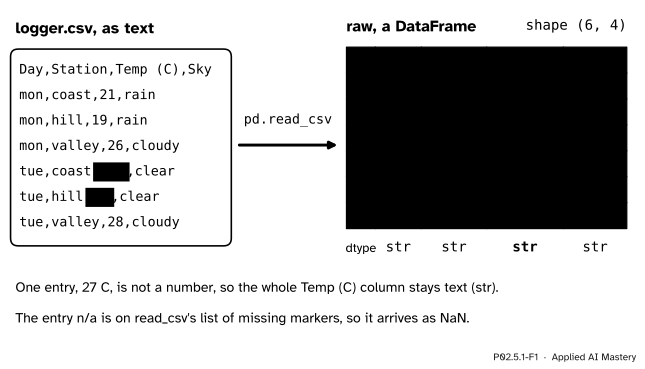
pd.read_csv turns the logger’s text into a table. One entry that is not a number keeps the whole Temp (C) column as text; the entry n/a becomes NaN, a missing value.
Two things happened in the picture, and they are the whole lesson.
One bad entry decides a column’s type. A column has one type for all its entries (P02.1.4). 27 C cannot be read as a number, so pandas keeps the whole column as text, and its type is str. Printed, 21 and '21' look the same, which is why the table seems fine.
Some entries mean “missing”.n/a is one of the markers that read_csv reads as NaN (not a number), pandas’ marker for a value that is not there.
A model learns only from numbers. A temperature column stored as text cannot reach it, and a column that has lost a reading on the way trains it on less than you think. Every project begins with this check.
Build it up
Step 1. Read.raw = pd.read_csv(file) gives a DataFrame (P02.4.2) of shape (6, 4). The file can be a path, or, as in this lesson, text held in the page and wrapped in io.StringIO so that it behaves like an open file.
Step 2. Check the types.raw.dtypes gives one type per column. All four say str. For Day, Station and Sky that is right. For a temperature it is a warning.
Step 3. Check what is missing.raw.info() prints, for each column, how many entries are non-null (present): 5 of 6 for Temp (C). raw.isna().sum() counts the missing values of each column directly: 1.
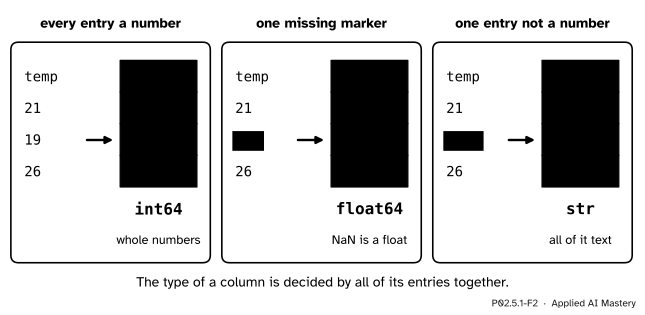
Step 4. Find the rule. Why str, and not a number type? Look at what read_csv does with three tiny files.
P02.5.1-F2
The same column three times. All whole numbers give int64. A missing marker gives float64, because NaN is a float. One entry that is not a number leaves the whole column as text.
Step 5. Repair the column. Write a function that turns one entry into a number, test it on the awkward entries, then apply it to every entry with Series.map.
Step 6. Tidy and save. Rename the columns to short lower-case names, and write the clean table to a new file with to_csv(index=False).
The formal statement
NoteHow read_csv chooses a column’s type
Every entry of a column is read as text first. Entries that match a missing marker become NaN. Among the defaults are the empty field, NA, N/A, n/a, NaN, nan, null, NULL and None.
If nothing is missing and every entry reads as a whole number, the column is int64. If every entry that is not missing reads as a number, and some are decimals or missing, it is float64, since NaN is a float.
Otherwise the column keeps the text. In pandas 3 its dtype is str, and its missing entries are still NaN. (Columns of True and False have a rule of their own and become bool.)
The rule is about the whole column. A column of ten thousand clean readings with one typing slip in it is a text column.
There are three ways to turn text into numbers, and they differ in what they do with an entry they cannot read.
Tool
An entry it cannot read
col.astype(float)
raises ValueError
pd.to_numeric(col, errors="coerce")
becomes NaN, silently
col.map(parse_temp)
whatever your function says
astype is for a column that is already clean: it stops at the first bad entry. to_numeric with errors="coerce" never stops, so it can turn a real reading into a missing one without a word. A function of your own can read every form you know about and raise an error on any form you have not met, which is the safest choice. The rule that keeps you honest is the same in every case: count the missing values before and after, and explain any change.
P02.5.1-F5
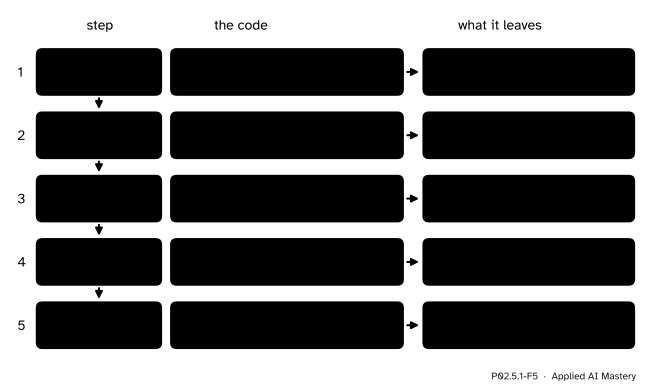
Reading a file well, in five steps. The count of missing values is checked after the repair: it must still be exactly 1.
When to_csv writes a missing value it leaves the field empty, as in tue,hill,,clear. An empty field is a missing marker, so the file reads back with the same NaN.
Worked example
Repair the Temp (C) column by hand, and compare with pd.to_numeric(errors="coerce").
parse_temp handles one entry in three moves. A missing entry arrives as NaN, which is a float and not a str, so it stays missing. Otherwise strip the spaces at the ends; if the text ends with C, drop the C and strip again; then convert with float.
P02.5.1-F3
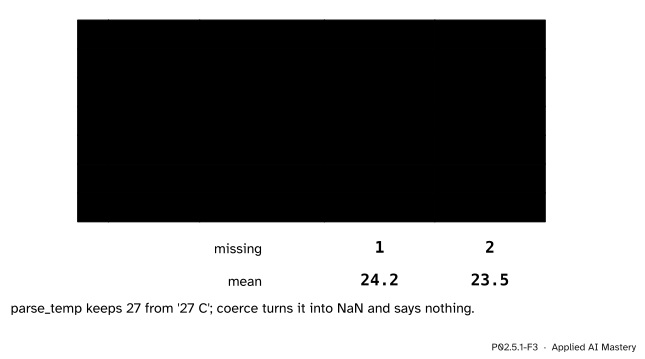
The trace, entry by entry. The two answers differ only in row 3, and that one row changes the count of missing values and the mean.
Entry by entry:
'21', '19', '26' and '28' have no C, so they become 21.0, 19.0, 26.0 and 28.0.
'27 C' loses its C, leaving '27', which becomes 27.0.
The missing entry stays NaN.
The repaired column has five numbers and one NaN, as before. Its mean skips the missing value (pandas reductions do; P02.5.2 shows why):
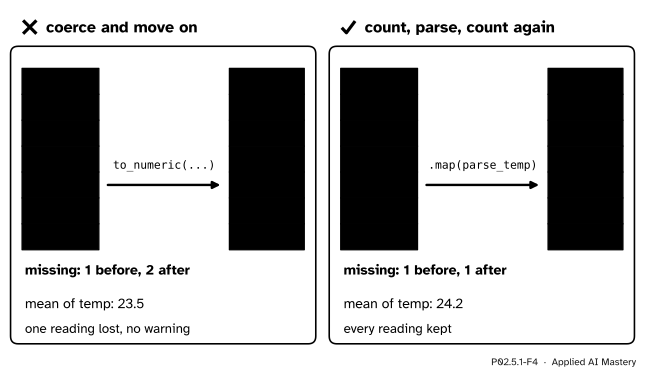
The count of missing values rose from 1 to 2. Nothing warned you; only the count shows it.
Code
The file is held as text in the lesson, so the code runs anywhere.
import ioimport mathimport tempfilefrom pathlib import Pathimport numpy as npimport pandas as pdLOGGER ="""Day,Station,Temp (C),Skymon,coast,21,rainmon,hill,19,rainmon,valley,26,cloudytue,coast,27 C,cleartue,hill,n/a,cleartue,valley,28,cloudy"""raw = pd.read_csv(io.StringIO(LOGGER))print(raw)print(raw.dtypes)print(raw.isna().sum())
   Day Station Temp (C)     Sky
0  mon   coast       21    rain
1  mon    hill       19    rain
2  mon  valley       26  cloudy
3  tue   coast     27 C   clear
4  tue    hill      NaN   clear
5  tue  valley       28  cloudy
Day         str
Station     str
Temp (C)    str
Sky         str
dtype: object
Day         0
Station     0
Temp (C)    1
Sky         0
dtype: int64
info() gives the same check in one table: the count of present entries and the dtype of every column.
The rule of the formal statement, on the three tiny files of the second figure.
for text in ["temp\n21\n19\n26\n", "temp\n21\nn/a\n26\n", "temp\n21\n27 C\n26\n"]: column = pd.read_csv(io.StringIO(text))["temp"]print(column.tolist(), column.dtype)
The repair from scratch: a parser for one entry, used in a loop, then with .map, which calls the function once for every entry of a Series.
def parse_temp(entry):"""One logger entry, such as '27 C' or '21', as a float. A missing entry stays missing."""ifnotisinstance(entry, str): # a missing entry arrives as NaN, a floatreturn math.nan entry = entry.strip()if entry.endswith("C"): entry = entry[:-1].strip()returnfloat(entry) # anything else that is not a number raises ValueErrorby_hand = []for entry in raw["Temp (C)"]: by_hand.append(parse_temp(entry))print(by_hand)fixed = raw["Temp (C)"].map(parse_temp)print(fixed.dtype, fixed.isna().sum(), fixed.mean())
coerced = pd.to_numeric(raw["Temp (C)"], errors="coerce")print("missing before:", raw["Temp (C)"].isna().sum())print("missing after coerce:", coerced.isna().sum(), " mean:", coerced.mean())print("missing after parse_temp:", fixed.isna().sum(), " mean:", fixed.mean())
missing before: 1
missing after coerce: 2   mean: 23.5
missing after parse_temp: 1   mean: 24.2
astype converts a column that is already clean, and stops at the first entry it cannot read.
print(pd.Series(["21", "19", "26"]).astype("int64").tolist())try: raw["Temp (C)"].astype(float)exceptValueError:print("astype(float) stopped: '27 C' is not a number")
[21, 19, 26]
astype(float) stopped: '27 C' is not a number
Finally, short lower-case names, the repaired column, and a round trip through a file in a temporary folder.
day            str
station        str
temp       float64
sky            str
dtype: object
day,station,temp,sky
mon,coast,21.0,rain
mon,hill,19.0,rain
mon,valley,26.0,cloudy
tue,coast,27.0,clear
tue,hill,,clear
tue,valley,28.0,cloudy

True
The last line printed True: the file reads back as the same table, NaN included.
Explore
This module’s interactive, the join matcher, lives in P02.5.4, where tables are matched on a key. Before you go there, change the logger text in the first code cell (on your own machine): replace n/a by -, or 27 C by 27, and predict raw.dtypes before you run it.
Pitfalls
P02.5.1-F4
Wrong beside right. Coercing turns the reading 27 C into a missing value and says nothing. A parser of your own keeps it, and the count of missing values proves that nothing was lost.
“It prints like numbers, so it is numbers.”
A str column holding '21' prints 21, exactly like an int64 column. Look at .dtypes, not at the printout. Adding two such columns joins the text, and .mean() stops with an error.
“to_numeric(errors='coerce') fixed the column.”
It made the column numeric by deleting what it could not read. Here that was a real reading, and the mean moved from 24.2 to 23.5. Coerce only after you have counted the missing values, and treat any rise in the count as a question to answer.
“astype(float) will clean it.”
astype converts and nothing more. On a column that holds '27 C' it raises ValueError. Repair the entries first, then convert.
“Saving with to_csv and reading back gives the same table.”
Only with index=False. By default to_csv also writes the index, 0 to 5, as a first column with an empty label, and read_csv brings it back as a column called Unnamed: 0.
Check yourself
Recall
1. A column of a CSV file holds 21, 19, 27 C and 26. What dtype does read_csv give it?
Show answer
str. One entry is not a number, so the whole column stays text.
2. Name three entries that read_csv reads as NaN by default.
Show answer
Any three of: the empty field, NA, N/A, n/a, NaN, nan, null, NULL, None.
3. What does pd.to_numeric(col, errors="coerce") do with an entry it cannot read?
Show answer
It writes NaN there, without any warning.
4. Why count the missing values before and after a conversion?
Show answer
A rise in the count shows that the conversion turned real entries into missing ones (here from 1 to 2).
5. What does index=False change in to_csv?
Show answer
The index is not written. Without it the index comes back as an extra column named Unnamed: 0.
Exercises
1.★ A file’s rain_mm column reads 12, 15, none and 18. What dtype does read_csv give the column, how many values does isna().sum() count, and what does pd.to_numeric(..., errors="coerce") return?
Show solution
none in lower case is not one of the default missing markers (None is), so the column is str and isna().sum() is 0. Coercing gives [12.0, 15.0, NaN, 18.0] as float64, one missing value. Here the count rises from 0 to 1 for a good reason, since none meant “no reading”. You could also pass na_values=["none"] to read_csv.
2.★★ A second logger writes Fahrenheit, as in '80.6 F'. Extend parse_temp so that it also accepts an entry ending in F, converting with \(C = (F - 32) \cdot 5 / 9\). What does '80.6 F' give, to one decimal?
Show solution
After the check for C, add: if the text ends with F, drop the F, strip, convert with float and return (f - 32) * 5 / 9. For '80.6 F': \(80.6 - 32 = 48.6\), and \(48.6 \cdot 5 / 9 = 27.0\). In floating point the result prints as 26.999999999999996, so round it, or compare with math.isclose.
3.★★★ Someone saved clean with clean.to_csv(path) and read it back with pd.read_csv(path). Describe the table they get, and give two different repairs.
Show solution
The file’s first line is ,day,station,temp,sky, and each row starts with its index, 0 to 5. The table that comes back has five columns: Unnamed: 0 holding 0 to 5, then the four real ones. Repair one: save with to_csv(path, index=False). Repair two: read with pd.read_csv(path, index_col=0), which turns the first column back into the index; the result then equals clean.
Summary card
One bad entry makes a column text; repair it and count what is missing.
P02.5.1-F1
Read, then check the types.
pd.read_csv(file), then .dtypes, .info() and .isna().sum().
A column is a number type only if every entry reads as a number or a missing marker.
astype stops at a bad entry; to_numeric(errors="coerce") hides it; .map(parse) repairs it.
Count the missing values before and after every conversion.
Save with to_csv(path, index=False).
Sources and next steps
Sources. Each was opened and checked against this lesson on 15 November 2026.
The pandas development team, IO tools (text, CSV, HDF5, …), pandas 3.1.1 User Guide. The section CSV & text files introduces read_csv; its part NA values lists the default missing markers, among them the empty field, n/a, NA, NaN, null and None.
The pandas development team, pandas.to_numeric, pandas 3.1.1 API reference: with errors="coerce", “invalid parsing will be set as NaN”.
The pandas development team, pandas.DataFrame.to_csv, pandas 3.1.1 API reference: the index parameter, default True, writes the row names, and the page’s own example uses index=False.
The pandas development team, Migration guides, pandas 3.1.1 User Guide, section The new string data type: from pandas 3.0 text columns are inferred as str, and their missing values are always NaN.