Every entry of an array shares one dtype, so nbytes = size * itemsize. Work the edges by hand before NumPy shows them: uint8 wraps round so 200 + 100 gives 44, float64 keeps about 16 digits, NaN is a float, astype(int) cuts toward zero, and mixed types promote.
P02.1.4L1 Core25 minIn review (what this means)
The maths and code on this page are checked by automated tests on every change, but an independent reader has not signed it off yet. Spot a mistake or a confusing step? Tell us.
Read an array’s dtype and itemsize, and compute its memory as nbytes = size * itemsize.
Work out by hand what uint8 arithmetic gives when a result leaves 0 to 255, using the remainder mod 256.
Compare float64 results with np.isclose instead of ==, and explain why 0.1 + 0.2 == 0.3 is False.
Predict the dtype of a mixed operation by promotion, and say what astype(int) does to 2.7 and to -2.7.
Explain why machine learning stores image pixels as uint8 and model weights as float32.
The question
Photos are stored as arrays of uint8, one number from 0 to 255 for each colour of each pixel. To brighten a photo you add 100 to every number, and a pixel that was a bright 200 comes out as 44, nearly black. No error, no warning. What happened to the 300? And why does a model train its weights as float32 rather than the float64 that NumPy uses by default?
From the last lesson
1. In temps.reshape(3, 4), where does the reading at flat position 7 sit?
Show answer
At [1, 3], because \({7 \,/\!/\, 4 = 1}\) and \({7 \,\%\, 4 = 3}\). It is the 18 that was at [2, 1].
2. Does temps.T keep the reading order of temps?
Show answer
No. It swaps the axes, so it reads 21, 27, 27, 29, …, down the columns of temps. A reshape keeps the reading order.
Intuition
Lesson P02.1.1 said an array holds its numbers in one block, all of one type. That type, the dtype, fixes two things for every entry at once: how many bytes it takes and what kind of number those bytes can hold. Because every entry has the same width, the block is easy to step through and its size is easy to work out.
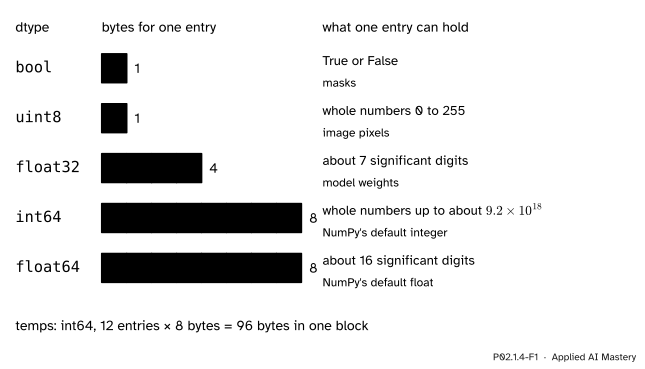
P02.1.4-F1
Five dtypes that machine learning meets every day, drawn to scale by the bytes one entry takes.
A wider dtype holds more, and costs more. int64 holds whole numbers up to about nine billion billion in 8 bytes; uint8 holds only 0 to 255, but in 1 byte. float64 keeps about 16 significant digits; float32 keeps about 7, in half the space. Choosing a dtype is choosing where the edges are. This lesson walks to each edge.
Build it up
Step 1. Bytes. Every array knows its dtype and the bytes per entry, its itemsize. The memory for the numbers is the size times the itemsize:
import numpy as nptemps = np.array([[21, 19, 26], [27, 23, 28], [27, 18, 30], [29, 20, 32]])print(temps.dtype, temps.itemsize, temps.size, temps.nbytes)for kind in (np.float64, np.float32, np.uint8): t = temps.astype(kind)print(t.dtype, t.itemsize, t.nbytes)
astype makes a copy with a new dtype. Our temperatures fit in uint8, so it costs them nothing; that will not always be true.
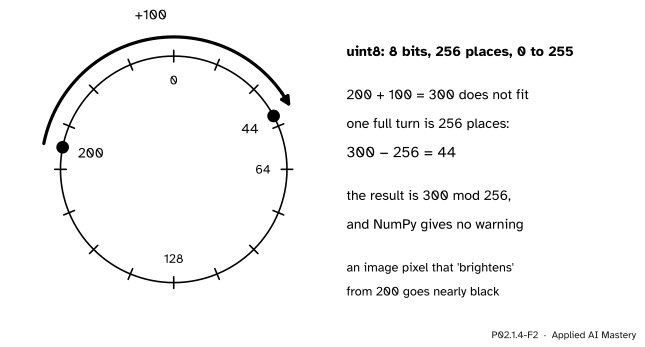
Step 2. The edge of uint8. Eight bits can be set in \({2^8 = 256}\) ways, so uint8 has room for 256 values, 0 to 255. A result outside that range is not stopped: it wraps round, like a dial of 256 places. Adding 100 to 200 moves 100 places round the dial, past 255, and on to 44.
P02.1.4-F2
uint8 counts round a dial of 256 places. From 200, a step of 100 passes 255 and carries on from 0.
By hand, the result is the remainder after dividing by 256: \({300 \,\%\, 256 = 44}\). NumPy agrees, silently:
The 100 is a plain Python whole number, and NumPy 2 gives a plain whole number the dtype of the integer array it meets, so the sum is computed in uint8 (the rule is NEP 50, cited below). A plain Python float meeting an integer array is different: temps * 1.8 is float64, because whole numbers cannot hold the fractions.
Step 3. The edge of float64. A float64 stores a number in binary with 53 significant bits, about 16 significant decimal digits. Most decimals, such as 0.1, have no exact binary form, so each is stored as the nearest value that fits. Lesson P01.2.1 met the consequence: 0.1 + 0.2 prints 0.30000000000000004, and so 0.1 + 0.2 == 0.3 is False. The same happens inside arrays. Use np.isclose, which allows a small tolerance:
print(0.1+0.2==0.3, np.isclose(0.1+0.2, 0.3))print(21*1.8+32) # Monday's coast reading in Fahrenheit
False True
69.80000000000001
Step 4. NaN is a float. A missing reading is marked by NaN, “not a number”, a special value that only floating-point dtypes have. An array holding one becomes float64, and an integer array cannot hold one at all:
Lesson P02.5.2 is about missing values; for now, remember that one NaN turns a column of whole numbers into floats.
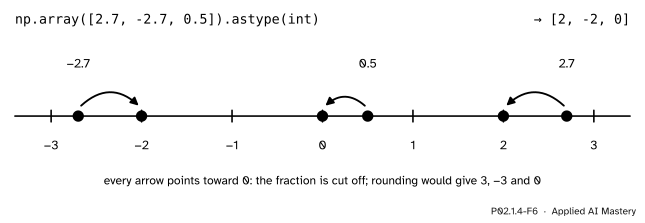
Step 5. From float to int.astype(int) keeps the whole-number part and throws the fraction away, which moves every value toward zero. It does not round:
P02.1.4-F6
astype(int) cuts toward zero, as Python’s int() does (P01.2.1). To round, call np.round first.
x = np.array([2.7, -2.7, 0.5])print(x.astype(int), np.round(x).astype(int))
[ 2 -2 0] [ 3 -3 0]
np.round(0.5) is 0.0, not 1.0: NumPy rounds a value exactly halfway to the nearest even whole number.
The formal statement
NoteDefinition: dtype, itemsize, nbytes
Every entry of an array has the array’s dtype, which fixes its itemsize, the number of bytes it takes. The bytes the entries take together are
Unsigned integers wrap round. With \(b\) bits there are \(2^b\) patterns, so an unsigned \(b\)-bit integer holds \({0, 1, \dots, 2^b - 1}\). When the true result \(r\) of an operation falls outside that range, the stored result is the remainder
\[
r \bmod 2^b ,
\]
the unique value in \({0, \dots, 2^b - 1}\) that differs from \(r\) by a whole multiple of \(2^b\). For uint8, \({b = 8}\) and \({2^8 = 256}\); for a negative true result, such as \({5 - 10 = -5}\), the stored value is \({-5 + 256 = 251}\). Signed int64 has \(2^{64}\) patterns, split evenly around zero: it holds \({-2^{63}}\) to \({2^{63} - 1}\), about \({\pm 9.2 \times 10^{18}}\), and wraps the same way beyond them.
Floats keep a fixed number of significant bits. A float64 keeps 53 significant bits and a float32 keeps 24. Each bit is worth a factor of 2, so 53 bits are worth
decimal digits, “about 16”, and 24 bits are worth \({24 \times 0.30103 \approx 7.2}\), “about 7”. The gap between two neighbouring floats grows with their size: just below 0.5 it is \({2^{-54} \approx 5.6 \times 10^{-17}}\), which is exactly the distance between 0.1 + 0.2 and the float nearest 0.3.
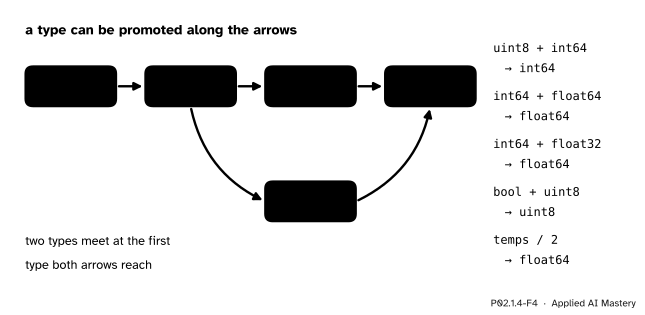
Mixing dtypes promotes. When two arrays of different dtypes meet, NumPy computes in a dtype that can hold both: the first one that both reach along the arrows below. A plain Python number of the same kind as the array (a whole number with an integer array, a float with a float array) is the exception: it takes the dtype of the array, as Step 2 showed.
P02.1.4-F4
Promotion. int64 and float32 first meet at float64, because a float32 cannot hold every int64 exactly. True division / always gives a float.
Worked example
Add 200 and 100 as uint8, bit by bit.
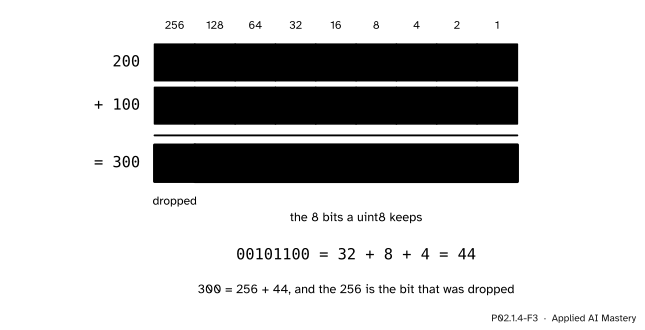
Write each number as a sum of powers of two, largest first. \({200 = 128 + 64 + 8}\), so its eight bits are 11001000. \({100 = 64 + 32 + 4}\), so its bits are 01100100. Add column by column from the right, carrying as in ordinary addition:
P02.1.4-F3
The sum needs nine bits. A uint8 has room for eight, so the ninth, worth 256, is dropped.
The columns worth 1, 2 and 4 give 0, 0 and 1. The 8 column has \({1 + 0 = 1}\). The 16 column has 0. The 32 column has \({0 + 1 = 1}\). The 64 column has \({1 + 1 = 2}\), which is written 0 with 1 carried to the 128 column. There, \({1 + 0 + 1 = 2}\) again: write 0 and carry 1 into a ninth column, worth 256. The full sum is 100101100, which is \({256 + 32 + 8 + 4 = 300}\), as it should be.
A uint8 keeps only the eight rightmost bits, 00101100, which is \({32 + 8 + 4 = 44}\). The bit that was dropped was worth exactly 256, so the stored result is \({300 - 256 = 44}\): the remainder \({300 \bmod 256}\) of the formal statement.
Code
From scratch: unsigned addition as a remainder, and the bits of a number found by repeated division by 2.
def add_unsigned(a, b, bits=8):"""a + b as an unsigned integer of the given width: the remainder mod 2**bits."""return (a + b) %2** bitsdef to_bits(n, bits=8):"""The binary digits of n, most significant first.""" out = []for _ inrange(bits): out.append(n %2) n //=2return"".join(str(d) for d inreversed(out))print(add_unsigned(200, 100), to_bits(200), to_bits(100), to_bits(300, 9), to_bits(44))print(add_unsigned(5, -10))
44 11001000 01100100 100101100 00101100
251
Now NumPy: the same wrap, the memory of a real photo, and promotion.
A million-pixel photo takes 3 million bytes as uint8 and 24 million as float64, eight times as much. That is why images are stored as uint8 and converted to floats only when a model needs them, and why model weights usually use float32: half the memory of float64, and about 7 digits is enough for the weights of most models. Lesson M10.1 tells the full story of floating point.
Explore
This module’s interactive, the shape shifter, lives in lesson P02.1.3. Every shape it shows holds the same twelve int64 numbers, 96 bytes, whatever the shape: the dtype and the shape are independent.
Pitfalls
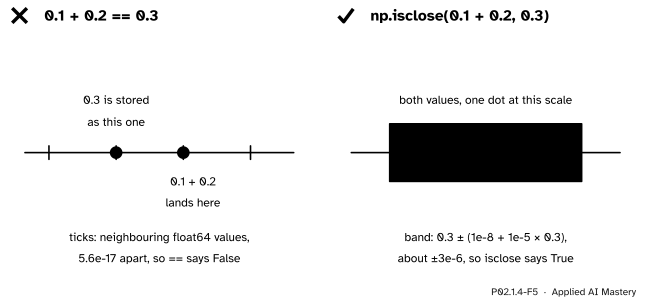
P02.1.4-F5
Wrong beside right. Left:== asks whether two floats are the very same value, and these two are neighbours. Right:np.isclose asks whether they are within a small tolerance.
“0.1 + 0.2 == 0.3 must be True.”
The two sides are neighbouring float64 values, one step of about \({5.6 \times 10^{-17}}\) apart, so == says False. Compare computed floats with np.isclose(a, b), which accepts \({\abs{a - b} \le 10^{-8} + 10^{-5}\,\abs{b}}\) by default, or np.allclose for whole arrays. Tests of machine-learning code compare floats this way.
“Adding to an image’s pixels just makes it brighter.”
In uint8, any result above 255 wraps round, so the brightest pixels turn dark, and NumPy does not warn about it for arrays. Convert to a wider dtype first, add, and limit the result to 0 to 255 with np.clip before converting back; the pixel that was 200 then becomes 255, as bright as it can be.
“astype(int) rounds to the nearest whole number.”
It cuts toward zero: 2.7 becomes 2 and -2.7 becomes -2. Use np.round(x).astype(int) to round. And never call astype(int) on an array that holds NaN: there is no whole number to give, and the result is meaningless.
“float32 is the same as float64, only smaller.”
It keeps about 7 significant digits instead of 16. In float32, 16777216 + 1 is still 16777216, because \({2^{24} = 16{,}777{,}216}\) and the next float above it is 2 further on. Weights do not need more, but sums of millions of small numbers can, so libraries often add up in a wider type.
Check yourself
Recall
1. How many bytes does temps take, and why?
Show answer
96: it has 12 entries of dtype int64, 8 bytes each, and nbytes = size × itemsize = 12 × 8.
2. What does np.array([200], dtype=np.uint8) + 100 give, and why?
Show answer
array([44], dtype=uint8). The true sum 300 does not fit in 0 to 255, so it wraps round: \({300 \bmod 256 = 44}\).
3. How should two computed floats be compared, and why not with ==?
Show answer
With np.isclose (or np.allclose for arrays). Rounding to the nearest float can leave two results that should be equal one tiny step apart, as with 0.1 + 0.2 and 0.3.
4. What dtype does np.array([21, np.nan]) have?
Show answer
float64. NaN exists only among floats, so the whole array becomes a float array.
5. What are np.array([2.7, -2.7]).astype(int) and the result dtype of int64 with float32?
Show answer
[2, -2], because astype(int) cuts toward zero, and float64, the first dtype that holds both.
Exercises
1.★ How many bytes do these take: the iris data matrix of shape (150, 4) as float64; a colour photo of 1,000 by 1,000 pixels as uint8; the same photo as float32?
Show solution
Iris: \({150 \times 4 = 600}\) entries of 8 bytes, \({600 \times 8 = 4{,}800}\) bytes. The photo has \({1000 \times 1000 \times 3 = 3{,}000{,}000}\) entries: 3,000,000 bytes as uint8, and \({3{,}000{,}000 \times 4 = 12{,}000{,}000}\) bytes as float32.
2.★★ Work out by hand, as uint8: \({250 + 10}\), \({5 - 10}\), and \({16 \times 20}\).
Show solution
Each result is the remainder mod 256. \({250 + 10 = 260}\), and \({260 - 256 = 4}\). \({5 - 10 = -5}\), and \({-5 + 256 = 251}\). \({16 \times 20 = 320}\), and \({320 - 256 = 64}\). NumPy gives the same for arrays of dtype uint8.
3.★★★ A float64 keeps 53 significant bits. Explain why every whole number up to \(2^{53}\) is stored exactly, but \({2^{53} + 1}\) is not, so that converting the int64 value \({2^{53} + 1}\) to float64 gives \(2^{53}\).
Show solution
A whole number below \(2^{53}\) needs at most 53 binary digits, so it fits in the 53 significant bits exactly; so does \(2^{53}\) itself, which is a 1 followed by zeros. Above \(2^{53}\), a float’s 53 significant bits must cover a number with 54 binary digits, so the last digit, worth 1, cannot be kept: only even numbers can be stored between \(2^{53}\) and \(2^{54}\), and neighbouring floats there are 2 apart. \({2^{53} + 1}\) is odd, so it lies halfway between the floats \(2^{53}\) and \({2^{53} + 2}\). Conversion rounds to the nearest float, and a tie is broken by the default rule of the IEEE 754 standard, toward the neighbour whose last bit is 0, which is \(2^{53}\). So float(2**53 + 1) == 2**53 is True: an int64 column of large identifiers can silently change when it is promoted to float64.
Summary card
The dtype decides how wide each entry is and where its edges are.
uint8. 0 to 255; results wrap: \({r \bmod 256}\), so \({200 + 100 \to 44}\).
float64. 53 bits, about 16 digits: compare with np.isclose, never ==.
NaN needs a float dtype; astype(int) cuts toward zero.
Promotion.int64 with float32 gives float64; / gives floats.
In ML. Pixels as uint8, weights as float32.
Sources and next steps
Sources. Each was opened and checked against this lesson on 15 November 2026.
NumPy developers, Data types, NumPy user guide, version 2.5: the bit sizes of the integer and float types (float32 with 23 mantissa bits and float64 with 52; the leading 1 of a binary number is not stored, which makes 24 and 53 significant bits), conversion with .astype(), the section “Array types and conversions between types”: following C casting rules, the value 300 converted to int8 overflows and becomes 44, that is 300 minus 256, and the section “Overflow errors” on the fixed size of NumPy’s numeric types.
NumPy developers, NEP 50: Promotion rules for Python scalars, status Final: a Python number is “weak”, so a Python int combined with an integer array, or a Python float with a float array, takes the array’s dtype, and np.array([100], dtype=np.uint8) + 200 gives array([44], dtype=uint8).
Python Software Foundation, Floating-Point Arithmetic: Issues and Limitations, The Python Tutorial, chapter 15 and section 15.1 “Representation Error”: decimal fractions such as 0.1 have no exact binary form, sums such as 0.1 + 0.1 + 0.1 == 0.3 are False, and an IEEE 754 double carries 53 bits of precision.
NumPy developers, numpy.isclose, NumPy reference, version 2.5: the test \({\abs{a - b}} \le {\text{atol} + {\text{rtol} \cdot \abs{b}}}\) with defaults rtol = 1e-05 and atol = 1e-08.
Next.P02.2 Broadcasting and vectorization puts arrays of these shapes and dtypes to work: arithmetic on whole arrays at once, and on arrays of different shapes. The full theory of floating point is M10.1.